Water Level Control
Water Level Control · ESP32
Know your tank level – right on your iPhone.
Water Level Control watches your tank, pool or aquarium. Two wire pairs hang in the water at the levels you choose. When the water reaches a pair, its switch turns on in Apple Home – and in Google Home if you want.
Try it free first. Water Level Control starts in demo mode by itself after setup – usually for 10 to 20 on/off changes, depending on the device. Like it? Then buy Maker Credits.
What it does
Use it to get a notification, or to start and stop your pump automatically:
- Low level (switch 1 turns off) → start filling.
- High level (switch 2 turns on) → stop the pump, no overflow.
No hardware is shipped. You buy the board in your own country, install our free firmware from Chrome or Edge, and switch it on with Maker Credits.
Wiring – 3 pins, no resistor
- Cut each pair at the height you want in the tank – for example low and high.
- Tie a 50–100 g weight to the cable so it does not float.
- Test with a glass of water before the cable goes into the tank.
Hardware
What you need
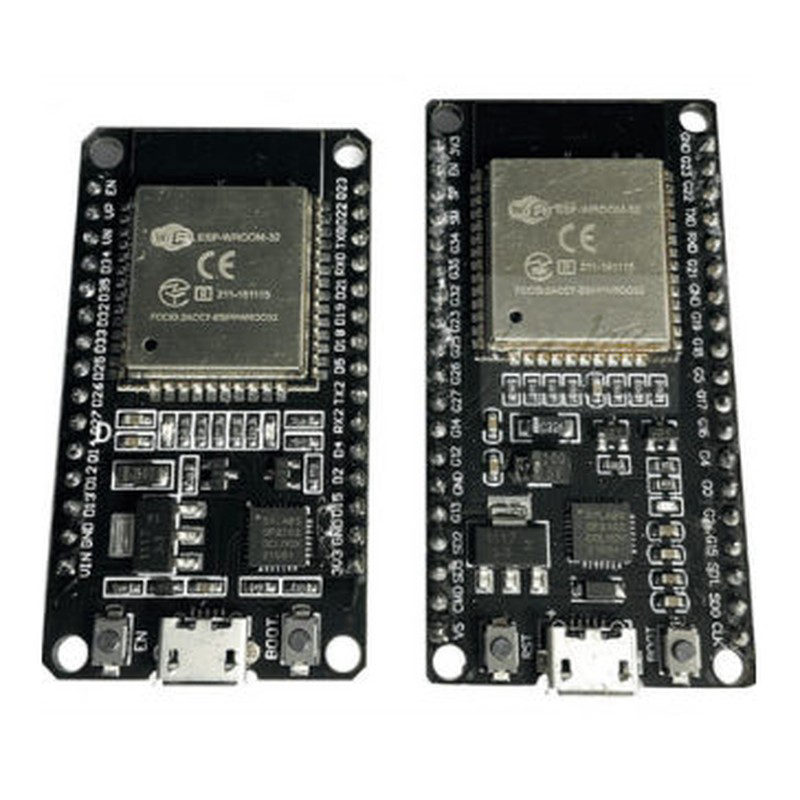 ESP32 DOIT DevKitThe only supported board. 30 or 36 pins both work. It must have an ESP32-WROOM-32 (or -32D) module with the built-in antenna.
- That is all – no box or other parts are needed.
- 2.4 GHz Wi-Fi, the Home app, and an Apple TV or HomePod as home hub.
- Optional: an Android phone with Google Home.
- 10 Maker Credits.
Setup
Set it up in 4 steps
- Install the firmware. Plug the board into your computer and open the ESP32 flasher in Chrome or Edge. Click Connect, then Install.
- Connect it to Wi-Fi. The board makes a Wi-Fi network called HomeHome-XXXXXX (password homehome). Join it from your phone. Choose the device type Water Leveling System, type your Gmail address, then your home Wi-Fi and its password. No setup page? Unplug the board, plug it in again and stand 1–2 m from it.
- Add it to Apple Home. Open the Home app, tap + and enter 111-88-111. Pick a room and a name – two switches appear.
- Make an automation. For example: when switch 2 turns on, turn off the pump. You get a notification too.
Google Home (optional)
Tap + › Set up device › Works with Google › +HomeHome and log in with the same Gmail address. Then email your Gmail address and device ID (XXXXXX) to info@homehome.app so we can activate it.
Settings and updates
Open http://hh-xxxxxx.local or the device's IP address in a browser – find the IP by long-pressing the tile in the Home app. Change settings and install updates there. Local mode keeps it working without internet (Apple Home only).
Free demo: after setup Water Level Control runs in demo mode by itself, so you can test it before you buy. The demo usually ends after 10 to 20 on/off changes. When you have bought Maker Credits and we have added them to your Gmail account, restart the device and it keeps working.
Activate: Water Level Control uses 10 Maker Credits – USD 5.00 a month. Write your Gmail address in the order note (or email info@homehome.app); we add the credits. See your devices at smart.homehome.app. How Maker Credits work →
Troubleshooting
Something not working?
It drops off Wi-Fi or will not connect
Apple Home network tips
No setup page after flashing
How do I reset it?
Need help with your tank setup?
Send us a WhatsApp message. Email: info@homehome.app.